گهواره تربیت کودک و بارداری
- 4.3
- Rating
- 1.00M
- Installs
- Free
- Price

 Analysis by App-foxy
Parenting advice is easiest to use when it arrives at the moment I actually need it. That is the main reason گهواره تربیت کودک و بارداری caught my attention. This free parenting app from Gahvare Family is designed around learning that follows a child’s age, while also giving mothers a place to consult one another. I found that combination more useful than a large, unfiltered library because it gives daily questions some context.
The app is aimed at parents and parents-to-be rather than children themselves. Its content rating is Everyone, and it runs on Android devices using Android 5.0 or later. The current version is 5.609.9, so it is worth checking compatibility before installing on an older phone. With a 4.3 average from around twelve thousand ratings and more than a million installs, it has clearly reached a substantial audience, although popularity should not replace personal judgment when the subject is a child’s health or development.
How I would use it from the first day
My recommended starting point is simple: open the app when you have enough time to set up a calm routine, not during a rushed nighttime feeding. Begin by exploring the age-related learning area and notice how the material is organized around a child’s stage. The benefit is not just finding an article; it is reducing the temptation to read advice meant for a much younger or older child and then worry that your own child is behind.
You May Also Like

 Blood Strike: 2.5 Anniversary
Blood Strike’s Loadouts Turn Every Drop Into a Tactical Gamble
A close look at Blood Strike’s custom loadouts: how fast access to signature weapons reshapes its battle royale rhythm, rewards preparation, and narrows the gap between fights.

 Pandora - Music & Podcasts
Pandora’s Music Is Easy to Start, but Harder to Recover
Pandora’s strength is its low-effort path from a seed to a station. Its weak spot is how much confidence it asks you to place in connection, setup, and quiet recovery.

 8 Ball Pool
 Is Built on Rivalries, Rematches, and Routine
A close look at the rivalries, rematches, shared routines, and unanswered safety questions that turn a quick pool match into a persistent mobile community.

 Samsung Music
’s Quiet Strength Is Playing What You Already Own
Its reach comes less from spectacle than from dependable access to a personal library. That simplicity is both the app’s strongest retention engine and its ceiling.

 AccuWeather: Weather Radar
AccuWeather Review: A Quick, Clear Forecast for Everyday Decisions
For everyday plans, the best forecast is the one you can understand quickly. AccuWeather makes rain timing, radar, and local conditions easy to act on, with a few trade-offs.

 Hill Climb Racing
Why Hill Climb Racing Still Turns Crashes Into One More Run
A tiny car, a bumpy hill and one more upgrade: Hill Climb Racing keeps resurfacing because its simple chaos makes every near-miss feel personal.
More From Our News Desk



A practical baseline workflow is to use the app as a short daily check-in. I would read one relevant piece, save the useful idea mentally or in my own notes, and then return later with a specific question. That approach is better than scrolling continuously through parenting content, because an endless stream of advice can make normal differences feel like problems.
For example, imagine a parent preparing breakfast while a toddler suddenly becomes difficult about food. Instead of searching the entire internet for a dramatic explanation, I would first open the age-appropriate material in گهواره تربیت کودک و بارداری, look for guidance connected to that stage, and compare the situation with other mothers’ experiences. The app can help organize the question before a conversation with a pediatrician, which is often more valuable than trying to diagnose anything from a phone.
The community element is especially helpful when the question is practical rather than medical. A parent may want to know how others handle a disrupted nap, a new routine, or a recurring household struggle. Reading several responses can reveal patterns and alternatives that a single article may not cover. I would still separate personal experience from professional advice: another mother’s successful routine may be encouraging, but it may not suit a different child, family schedule, or health situation.
That distinction is important because the app works best as a parenting companion, not as a replacement for a doctor, midwife, therapist, or emergency service. If a child has concerning symptoms, a sudden change in behavior, a feeding issue, or a developmental worry that feels serious, I would use the app to prepare clearer questions and seek qualified help rather than treating community discussion as a final answer.
Make the age-based structure work for you
The strongest habit is to keep your reading tied to the child’s current age and immediate needs. I would avoid jumping through every available topic simply because it is visible. A parent with a newborn does not need to absorb advice aimed at preschool routines in the same sitting, and a parent of an older child may gain little from repeatedly reading early-stage material.
There is also a useful emotional advantage to this narrower approach. Parenting apps can easily become sources of comparison, especially when every article seems to describe an ideal routine. By treating the age guidance as a map rather than a checklist, I can use it to notice possibilities without turning every difference into a failure. That is one of the more mature ways to use this particular app.
Settings and personal habits worth checking
I would spend a little time reviewing the app’s available preferences rather than accepting every default automatically. The most valuable settings are the ones that help keep the content relevant to the child’s stage and the parent’s situation. If the app offers choices for age, pregnancy, or content interests on your device, select them carefully and revisit them when circumstances change. A wrong stage can make a helpful service feel strangely irrelevant.
I would also check how notifications behave. Parenting reminders can be useful when they prompt a short reading session, but they can become noise during an already demanding day. My preference would be to keep only the alerts that support a repeatable routine and silence anything that encourages anxious, constant checking. The goal is to make the app fit family life, not make the family organize itself around the app.
Another setting-related habit is to notice the language and tone of community discussions. Since the service is built for mothers to consult one another, the conversation may feel more personal than a formal reference guide. That warmth is a strength, but it also means I would read advice with attention to context. Before applying a suggestion, I would ask: was that child the same age, was the problem similar, and did the parent describe any medical or family detail that changes the situation?
I would keep personal information sharing conservative as well. A parenting community becomes more useful when people explain a situation clearly, but there is no need to publish identifying details about a child. A short, focused question usually produces better discussion than a long post containing names, locations, or unnecessary private history.
Faster patterns for busy parents
Experienced use is less about discovering a secret button and more about repeating a sensible process. I would create three mental lanes: current-stage learning, a question I want to investigate, and community experiences that might offer practical ideas. Keeping those lanes separate prevents the common mistake of treating every interesting post as equally urgent.
When I encounter a useful article, I would not immediately open several related topics. Instead, I would note the one action that could realistically be tried that day. For a sleep-related issue, that might mean observing the existing routine before changing it. For a feeding concern, it might mean recording when the difficulty happens. For pregnancy preparation, it could mean turning a vague worry into a specific question for a healthcare professional. The app becomes more effective when its information leads to observation rather than impulsive experimentation.
A second efficient pattern is to read community replies after forming my own question, not before. Starting with a clear problem makes it easier to identify relevant experiences and ignore confident but unrelated comments. I would look for repeated practical details, differences between families, and signs that a suggestion depends on a special circumstance. This is a better use of discussion than simply searching for the one answer I hope to hear.
I would also avoid using the app as a late-night anxiety loop. Nighttime is when small concerns can feel enormous, and reading several conflicting opinions can make sleep harder. If something is not urgent, I would write down the concern, return during the day, and assess it with a clearer mind. This is a simple habit, but it protects the app’s educational value from becoming emotional overload.
For households sharing responsibility, the app can support a short weekly conversation. One parent can bring a topic that seemed useful, while the other explains what is realistic in the home’s schedule. This prevents one person from becoming the sole manager of every recommendation. It also exposes a limitation: an app can offer guidance, but it cannot resolve disagreements between caregivers or account for every family’s resources.
Where the app is especially useful
I see the greatest value for first-time parents who want structured learning without immediately committing to a long course. The age-based approach provides a starting point, while the mother-to-mother consultation area adds the everyday perspective that formal guides sometimes lack. Pregnant users may also appreciate having parenting preparation and later child-related learning within the same general environment.
It can be useful for a parent who feels overwhelmed by broad internet searches. Search engines often mix reliable medical pages, personal blogs, advertisements, and alarming anecdotes. A focused parenting app offers a calmer first stop, especially for ordinary questions about routines and development. I would still verify high-stakes information elsewhere, but the app can help me phrase that verification more intelligently.
It is also a reasonable companion for relatives who help with childcare. A grandparent or partner may not need to read everything, but reviewing material connected to the child’s current stage can make household expectations more consistent. That said, the app is less useful if the adults around the child refuse to discuss differences in approach. Information alone does not create agreement.
Trade-offs, friction, and situations where I would skip it
The biggest trade-off is the tension between personalization and simplicity. Age-based guidance is more relevant than a completely general feed, but parenting is not always neatly divided by age. A child may have a concern that does not match the current stage, or a pregnancy question may require professional context rather than community discussion. In those moments, I would use the app as a starting point and move to a specialist source.
The community can also be both reassuring and confusing. Several mothers may describe different solutions to the same problem, and the most detailed response is not automatically the most reliable. I would be cautious with advice involving medication, restrictive diets, developmental labels, or anything that could delay medical care. The app’s social dimension works best for comparing routines and feelings, not making clinical decisions.
Parents who prefer a concise, evidence-focused reference may find the conversational style less efficient than a medical handbook or a trusted healthcare website. Likewise, users who dislike notifications, discussion feeds, or age-based browsing may prefer a simple notes app combined with one carefully chosen professional resource. I would not install this app expecting a complete replacement for those tools.
Another limitation is that the usefulness of the experience depends on how actively I filter it. A parent who opens the app without a goal may spend time reading material that is interesting but not actionable. That is not a flaw unique to parenting software, but it matters here because tired parents have very little spare attention. The best results come from short, intentional visits.
What I would want to know before installing
The app is free, which makes it easy to try without financial commitment. I would install it if I wanted age-oriented parenting learning and a place to compare everyday experiences with other mothers. I would not install it as my only source for urgent health decisions, nor would I expect it to produce a perfectly customized plan for every child.
Its Everyone age rating makes it broadly accessible, but that does not mean every discussion will feel equally suitable for every family. Parents should still decide what their children can see if a device is shared. I would keep my own account or reading space separate from a child’s casual phone use, particularly because parenting discussions can include adult concerns even when the app itself is not restricted to adults.
Android users with older devices should remember the minimum requirement of Android 5.0. The app was released on August 6, 2018, and its ongoing version number shows that it has continued to receive updates, with version 5.609.9 currently listed. I would still leave enough storage and use a stable connection when first exploring it, since a smooth setup makes it easier to judge the content rather than blaming a frustrating first session.
It is also worth knowing who stands behind it. Gahvare Family focuses this product on family learning and maternal consultation, so the app feels more specialized than a generic calendar, baby tracker, or broad social network. That focus is its identity: if I want age-related guidance and peer conversation in one place, it makes sense; if I only want reminders or private record-keeping, another category of app would be a better match.
My verdict after settling into a routine
گهواره تربیت کودک و بارداری works best when I treat it as a guided reading and discussion space rather than an authority that decides what my family should do. Its age-centered organization can make parenting information easier to approach, and the community gives ordinary situations a human dimension. The free price and broad Android compatibility make experimentation straightforward for many parents.
My favorite way to use it would be a short, repeatable routine: check the current stage, read one relevant piece, write down one practical observation, and use community responses to broaden—not replace—professional judgment. That workflow keeps the app helpful without allowing it to dominate the day. It also turns scattered advice into something I can test thoughtfully in real family life.
With an average of 4.3 from roughly twelve thousand ratings and more than a million installs, the app has enough reach to be a credible option worth trying, while the number of ratings should still be read as a sign of audience size rather than a promise that every family will have the same experience. My recommendation is strongest for parents who want structured learning plus peer perspective. I would suggest a medical reference, direct professional care, or a simpler utility instead when the need is clinical, urgent, highly private, or purely organizational.
My bottom line: use it as a calm starting point, keep your questions specific, and let real-world observation and qualified care remain in charge.
FAQs for گهواره تربیت کودک و بارداری
01What features does the گهواره app offer for child development and pregnancy?
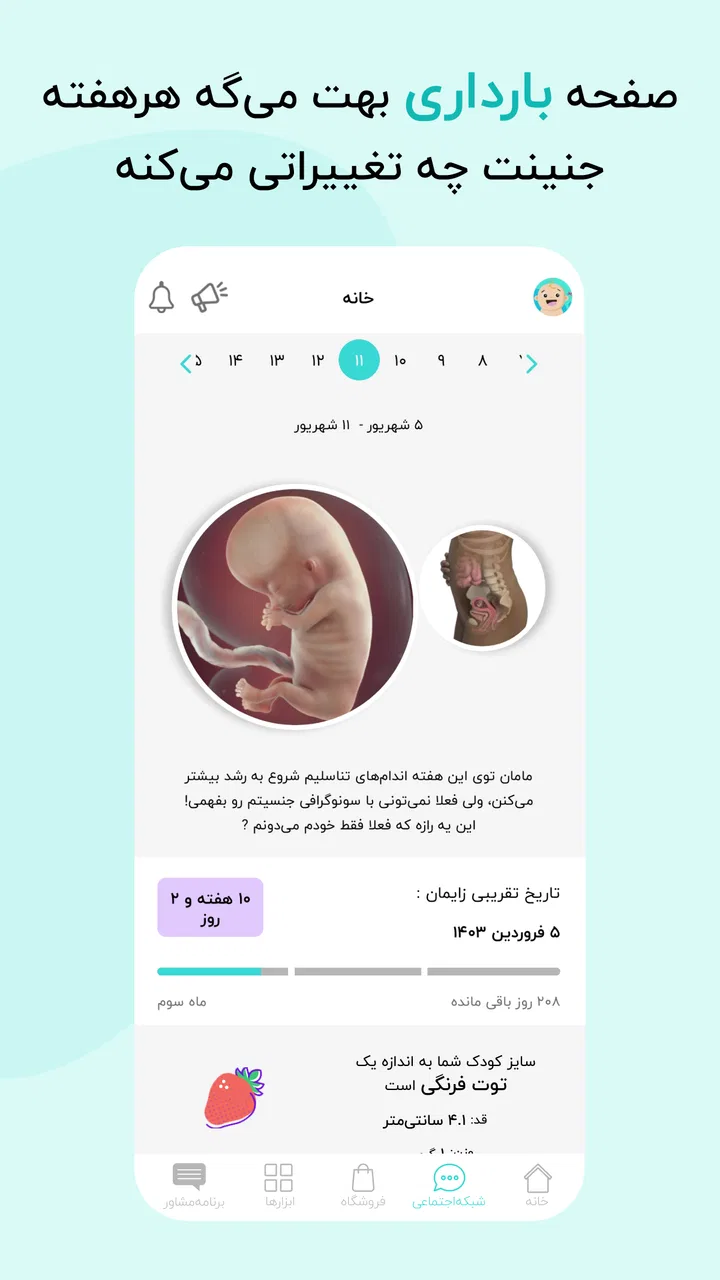
گهواره is designed to support parents through pregnancy and early childhood development. It offers features like daily tips for expecting mothers, developmental milestones for children, and educational resources to guide parents. Users can access personalized content based on their child's age, ensuring relevant and timely information.
02Is گهواره available for both Android and iOS devices?
Yes, گهواره is available for download on both Android and iOS platforms. Users can find the app on the Google Play Store and Apple App Store, making it accessible to a wide range of smartphones and tablets. Ensure your device meets the app's system requirements for optimal performance.
03How does گهواره ensure the accuracy of its parenting and pregnancy advice?
The app collaborates with experts in pediatrics, obstetrics, and child psychology to ensure all advice and content are accurate and reliable. Regular updates incorporate the latest research and guidelines, providing users with trustworthy information that aligns with current best practices in parenting and pregnancy care.
04Are there any subscription fees or in-app purchases in گهواره?
گهواره offers both free and premium content. While many features are accessible at no cost, users can subscribe to premium plans for additional resources and personalized content. In-app purchases might include specialized guides or access to exclusive expert sessions, enhancing the user experience.
05How can users ensure data privacy and security when using گهواره?
گهواره prioritizes user data privacy by employing robust encryption protocols. The app requires minimal personal information and offers users control over their data sharing preferences. Additionally, it complies with international data protection regulations, ensuring a secure environment for all user interactions.
Pros
- Comprehensive parenting resources.
- User-friendly interface.
- Customizable notifications.
- Wide range of expert advice.
- Regular content updates.
Cons
- Limited offline access.
- Some features require payment.
- Ads can be intrusive.
- Limited language options.
- Occasional bugs and crashes.

گهواره تربیت کودک و بارداری
Gallery